

A Shared Terminology for Comparing Workflow Systems
A community-built framework that helps researchers describe workflow management systems in consistent terms. Use it to compare tools based on structure, composition, execution, data handling, and metadata practices instead of reputation or familiarity.
Purpose
Provide a common vocabulary to describe and compare workflow management systems without ranking them.
Audience
Workflow system developers, domain scientists, and infrastructure teams evaluating WMS fit.
Outcome
Clearer system selection, better design discussions, and more transparent reporting.
Suter, F., Coleman, T., Altintas, Í., Badia, R. M., Balis, B., Chard, K., Colonnelli, I., Deelman, E., Tommaso, P. D., Fahringer, T., Goble, C., Jha, S., Katz, D. S., Köster, J., Leser, U., Mehta, K., Oliver, H., Peterson, J.-L., Pizzi, G., Pottier, L., Sirvent, R., Suchyta, E., Thain, D., Wilkinson, S. R., Wozniak, J. M., Ferreira da Silva, R. (2025). A Terminology for Scientific Workflow Systems. Future Generation Computer Systems.
How to use the terminology
Use the axes below as a checklist when documenting a system or comparing candidates for a new project.
1. Describe the workflow shape
Clarify how tasks, data, and dependencies are organized and whether the workflow can adapt at runtime.
2. Capture how it is expressed
Note whether users define workflows via schema files, APIs, or GUIs and how much detail is required.
3. Document execution + data behavior
Summarize planning, orchestration, data movement, storage, and metadata capabilities.
Five axes of comparison
Each axis captures a core aspect of how a workflow system is designed and operates. Select the section you need and jump directly to the details.
Workflow Characteristics
Structure, coupling, and adaptability.
Composition
How workflows are described and modularized.
Orchestration
Planning, execution models, and coordination.
Data Management
Movement, storage, and data handling granularity.
Metadata Capture
Provenance, monitoring, and anomaly insight.
Workflow Characteristics
Fundamental structural aspects that shape how workflows run and adapt. These characteristics influence scheduling, optimization, and resource efficiency.

Flow
- Task: Components receive inputs, produce outputs, and terminate; WMSs manage execution order and dependencies.
- Iterative: Tasks run multiple times, ending after each iteration and waiting to be invoked again.
- Data: Execution is driven by data movement; operators remain active while data is available.
Granularity
- Functions: Workflows compose function calls; scripts and runtimes can be viewed as workflows.
- Standalone executables: A common model where executables aggregate function calls and process inputs to produce outputs.
- Sub-workflows: Hierarchical compositions break large workflows into reusable modules.
Coupling
- Tight: Tasks must run concurrently, often co-located or synchronized via periodic data exchange.
- Loose: No concurrency constraints, enabling flexible scheduling.
Dynamicity
- Branches: Conditional paths activate based on data, resource state, or events.
- Runtime interventions: Users or external processes can modify execution plans during runtime.
Domain
- Specific: Systems tuned for a single scientific community or discipline.
- Agnostic: Systems designed to serve multiple domains.
Composition
How workflows are defined, organized, and configured. This axis highlights the tradeoff between expressiveness, abstraction, and accessibility.
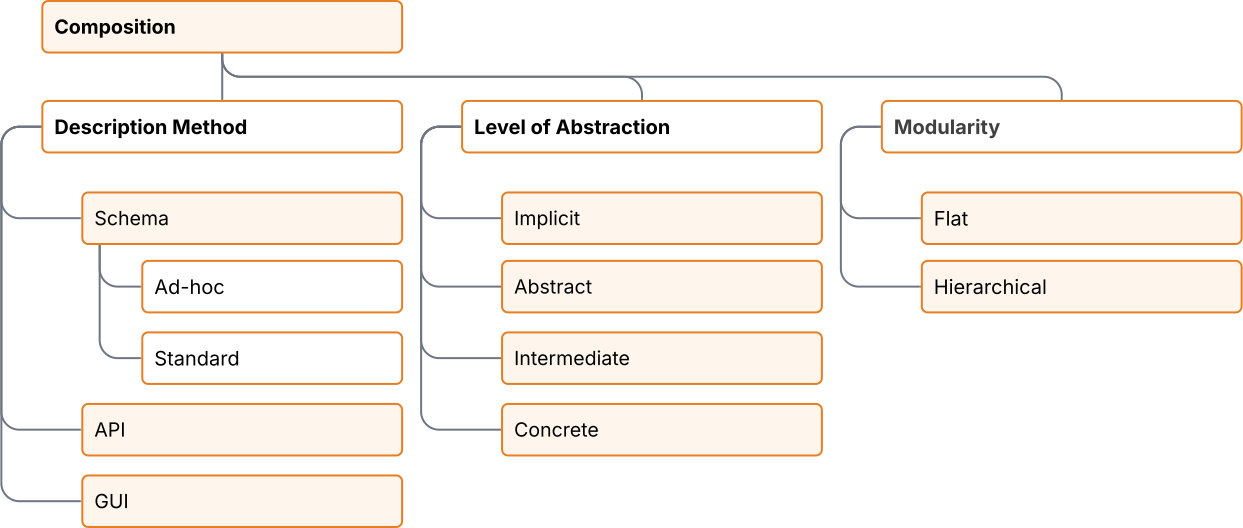
Description Method
- Schema: Workflows described in files using specific formats (XML, JSON,
YAML, or a domain-specific language).
- Ad-hoc: Syntax understood only by a single WMS.
- Standard: Syntax aligned with shared standards such as CWL, IWIR, or WfFormat.
- API: Workflow descriptions built in code using languages or templating engines, enabling loops and conditionals.
- GUI: Workflow authoring through a graphical interface.
Level of Abstraction
- Abstract: Logical structure and resource needs only; no infrastructure bindings.
- Intermediate: Mix of high-level structure with required execution details.
- Concrete: Fully specified workflow ready to run as described.
- Implicit: Structure inferred from API calls or dataset metadata.
Modularity
- Flat: Single-layer description of components.
- Hierarchical: Nested sub-workflows support scalable design and reuse.
Orchestration
Execution management approaches, from planning to the way tasks are launched and coordinated across resources.
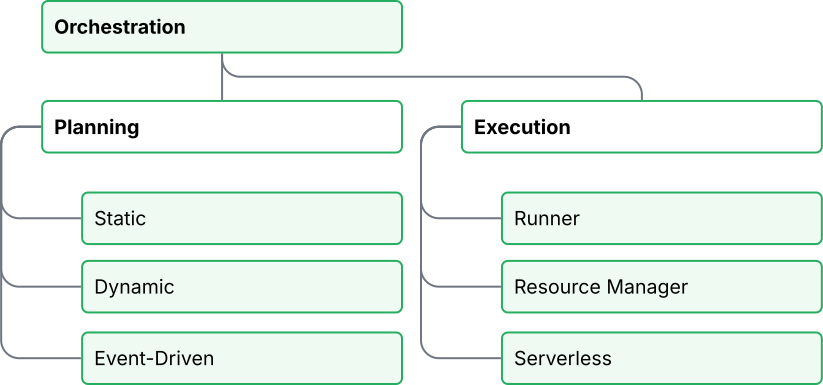
Planning
- Static: All scheduling decisions are made before execution starts.
- Dynamic: Scheduling adapts during execution based on runtime information.
- Event-driven: Execution reacts to triggers and conditions at runtime without pre-planning the entire workflow.
Execution
- Runner: WMS acquires resources and manages task execution directly.
- Resource Manager: Resource allocation is delegated to schedulers or container orchestration systems.
- Serverless: Execution is delegated to cloud services that manage scaling and infrastructure.
Data Management
How data moves through a workflow, how it is stored, and the granularity of data exchange between components.
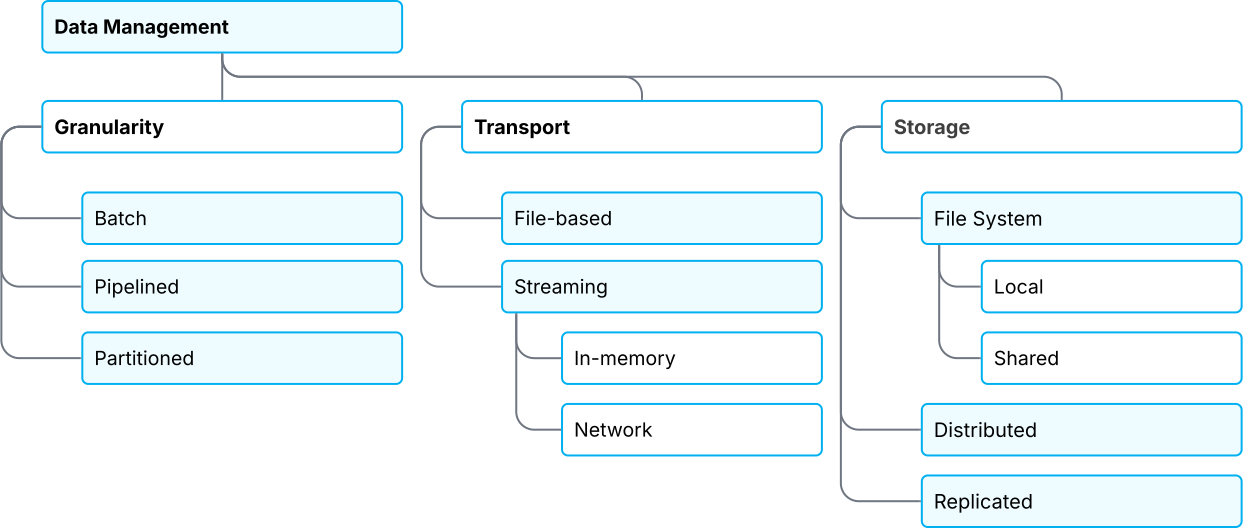
Granularity
- Batch: Inputs are consumed and outputs produced in full at task boundaries.
- Pipelined: Components stream records as they run, common in in situ analysis.
- Partitioned: Data is divided into partitions for transfer and processing.
Transport
- File-based: Intermediate data is written to and read from files.
- Streaming: Data is pushed directly between components.
- In-memory: Shared memory transfer for co-located components.
- Network: Data streams across networked nodes.
Storage
- File System:
- Local: Data stored on node-local storage.
- Shared: Centralized storage accessible across a cluster.
- Distributed: Storage spread across multiple facilities for scalability and resilience.
- Replicated: Redundant copies improve reliability and availability.
Metadata Capture
Context captured during execution that supports reproducibility, optimization, monitoring, and error handling.

Provenance
- Prospective: Captures workflow design, configuration, and intended behavior.
- Retrospective: Captures what happened during execution, including lineage and runtime data.
Monitoring
- Performance insights: Tracks resource use and bottlenecks during execution.
- Optimization input: Data supports rescheduling and future workflow tuning.
Anomaly Detection
- Fault handling: From logging warnings to retrying tasks or triggering fallback branches.
- User intervention: Supports escalation when automation cannot resolve the issue.